 40kn Sail Router
Your boat
Choose a polar, then make its speeds, sailing angles and engine match how you really sail.
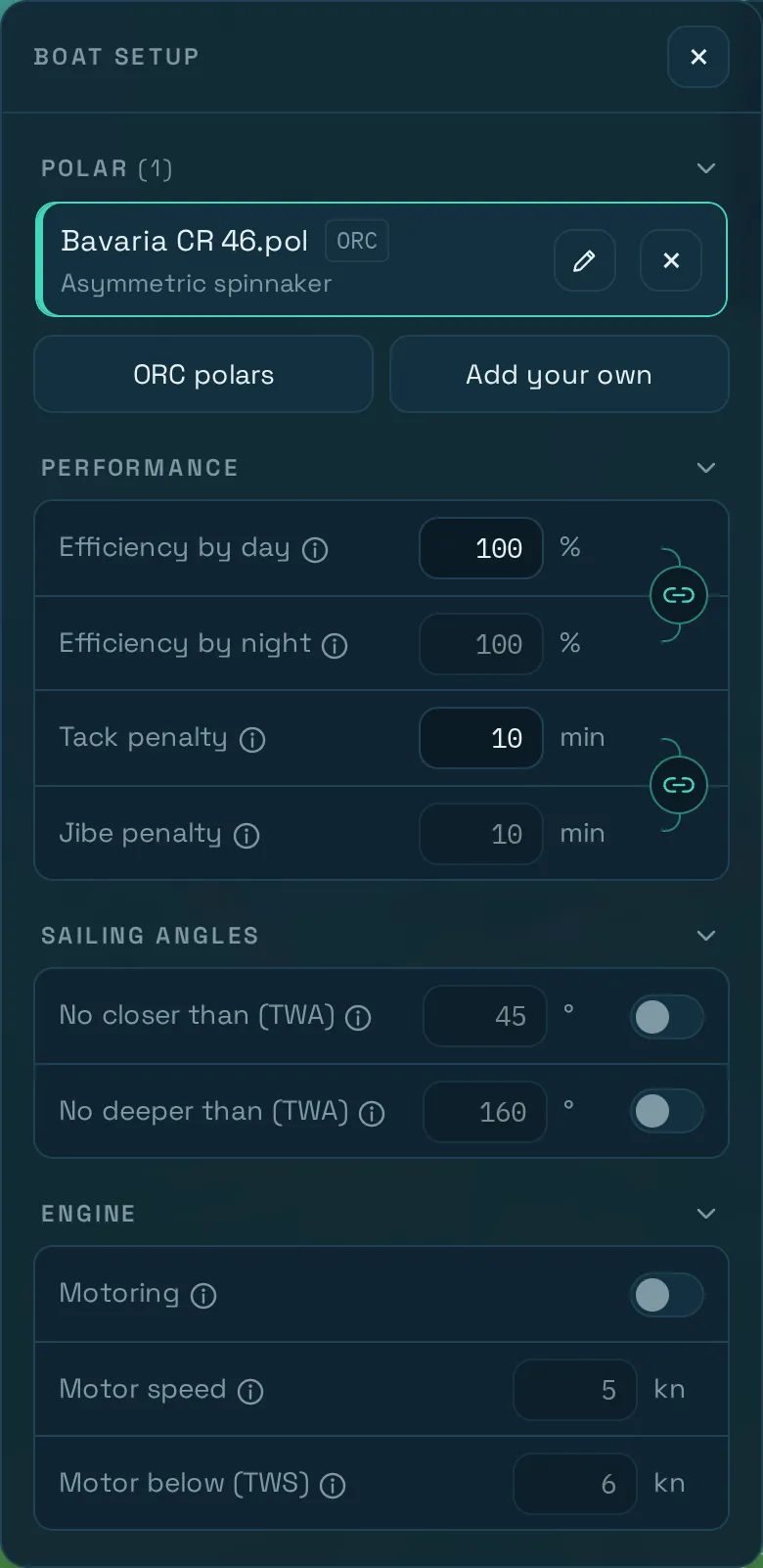
Everything the router calculates starts from your boat’s speed. All of this is in Boat setup, the top button on the left of the map.
The polar
A polar gives the boat speed for each wind angle and wind speed. How routing works shows what one looks like. Tap a polar in the list to route with it. The pencil opens it for editing and the ✕ deletes it.
ORC polars
ORC polars searches the built-in list of almost 100 boats by type or manufacturer. Look at the diagram, then press Add to my polars.
An ORC polar comes from a measurement certificate and assumes the boat is sailed well, with the sails named on its row. Your boat, sails and load may differ, so treat it as a starting point.
Your own polar
Add your own takes a .pol file or pasted text, with the wind speeds across the top and the wind angles down the side. For example:
TWA\TWS   6     9     12    16    20
45        3.8   5.2   6.1   6.6   6.8
60        4.6   6.0   6.9   7.4   7.7
90        5.0   6.6   7.5   8.1   8.6
120       4.4   6.1   7.2   8.2   9.0
150       3.1   4.6   5.9   7.1   8.1
180 2.5 3.8 5.0 6.2 7.2- Speeds and wind speeds are in knots, and angles run from 0° to 180°.
- Separate the cells with spaces, tabs or semicolons. A comma isn’t accepted, because it could also be a decimal mark.
- You need at least two wind speeds and two angles.
The app checks the table with the same code the router uses and draws the result, so the diagram shows what the router will sail. To change the whole polar at once, edit it and set a new Max boat speed, which scales every value in proportion.
Where a polar runs out
Check that your table covers the conditions you may meet:
- Stronger wind than the last column: the router keeps using the last column’s speeds. It doesn’t reef or slow down, so set Avoid wind above in Routing setup for anything you wouldn’t sail in.
- Lighter wind than the first column: the speeds shrink in proportion, down to zero at no wind.
- Angles outside the table: the speed is zero, so the router won’t sail them. A table that stops at 150° means the boat never runs deeper than that.
Performance
Efficiency by day and by night scales the whole polar. Night runs from sunset to sunrise at the boat’s position. The two values are linked until you open the link button between them.
Boats are almost always slower than their theoretical polar: reefing, sea state, a loaded cruising boat and a tired crew all cost speed. The field accepts up to 120 %, but anything above 100 % doesn’t happen in reality. As a rough start, try 80 to 90 %, with less at night if you sail more conservatively then. To refine it, compare a passage you’ve logged with what the router says for the same conditions.
Tack and jibe penalty is the time lost per manoeuvre, up to 30 minutes. With the default of 0, the route can change tack as often as it likes for free, so setting even a few minutes gives you a more sailable route. Each penalty must be shorter than the routing step, and the app tells you if it isn’t.
Sailing angles
No closer than and No deeper than keep the route out of angles you don’t want to sail, such as pinching upwind or running dead downwind with a preventer. This is useful, for example, to exclude beating into the wind in heavy conditions, or because the crew won’t take it. They are off by default and apply on both tacks. Inside those angles the router tacks or jibes instead, all the way to the destination. A limit applies at every wind strength, not only in heavy weather.
Your polar stays as it is. The limits apply only to the routing.
Engine
Switch on Motoring, then set:
- Motor speed: the boat’s speed under engine, in any direction.
- Motor below (TWS): the boat motors while the true wind is below this speed, and sails above it.
Keep these in mind:
- The router motors whenever the wind is below your limit and doesn’t count fuel, so check the motored time against your range.
- Efficiency doesn’t apply to motored legs, and they carry no tack or jibe penalty.
- The line above Run Router says when the engine is on. On the result,
Engappears in the readout on motored legs, the Boat Speed graph marks them, and the report has anEngine:line.
Your boats stay on this device
Your polars and settings are stored in the browser on this device, and don’t sync to any other. Install the app to protect them, and keep a copy of your own polar file somewhere safe.